
Our work
Connected workflows, from documents to daily operations
Choose a case and a function to explore the actual interfaces and outputs · Screens and sample files are shown in their original Korean or Japanese
Overview
From an email inquiry
to an itinerary and quotation
Connect the customer's requirements with company materials to prepare itinerary and quotation drafts, with revisions kept under each trip
The inbound division of a leading Korean travel group
01Scattered experience
Past trips lived in email and files
Requirements stayed in email, while itineraries and quotations were kept in separate files. Even a similar trip meant finding and combining the information again.
02Connected knowledge
Requirements and documents, together by trip
Requests, references, itineraries, quotations and revisions are kept in one trip workspace. Drafts refer to company materials, with changes recorded alongside them.
03Practical value
Move from finding files to reviewing a proposal
Staff review the draft and references in the same workspace and can focus on customer conditions and pricing discussions. Previous documents and revisions support the next response.
Demo
Workflow details
Follow the actual screens from request entry through document preparation and revisions
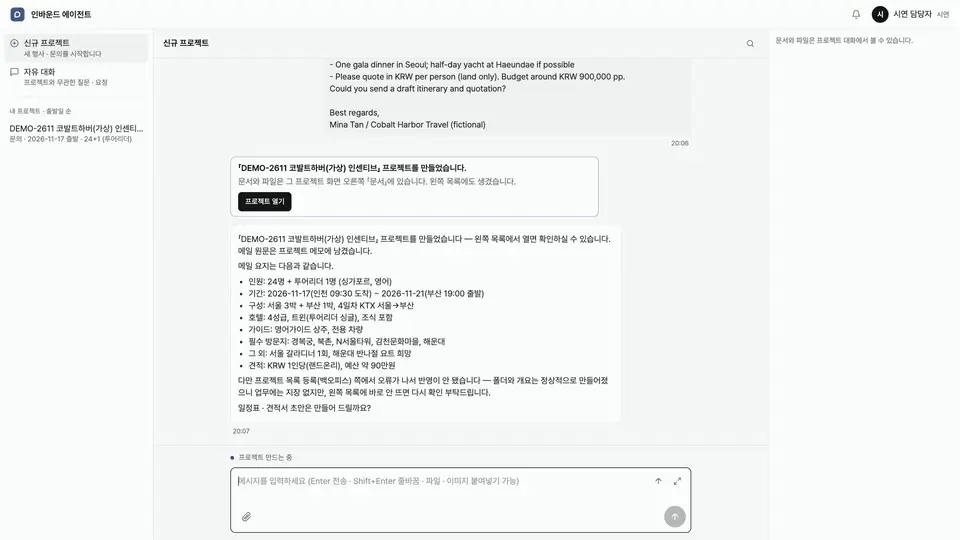
Paste the customer's email to create a trip workspace. The system summarizes the request and keeps subsequent conversations and outputs together.
Separate confirmed conditions from points that still need checking. The referenced company materials help staff review outstanding hotel, venue and other requirements.
Prepare itinerary and quotation drafts from the request. Staff review the price table and per-person amount, check cost items and confirm the customer's conditions.
Download the quotation as a PDF and editable Excel file. Staff can continue revising the reviewed content and prepare the material to send to the customer.
Summarize the change request and the points to check. Prepare a new version of the requested document and identify related documents that need review.
Find conversations and documents in the trip workspace. New and earlier versions remain available so staff can follow revisions and continue the work.
Overview
Bookings across sales channels.
A clear list of what needs attention.
Bring reservation collection, change review and service arrangements into one operational view, instead of moving between separate sales channels
The inbound division of a leading Korean travel group
01Scattered information
Bookings and changes were split by channel
Staff had to check different reservation formats and revisions in each sales channel, then reconcile booking status with the arrangements still to be made.
02Connected records
Source, changes and progress in one place
Bookings use common fields and retain previous and updated values, sources and review status. Change checks and service arrangements remain connected to the same booking.
03Operational value
Reservation data becomes the next task
Staff can start with changes, missing information and pending arrangements. The booking records help them decide what needs attention first.
Demo
Function details
Explore the booking list, collection status and operational tasks screen by screen
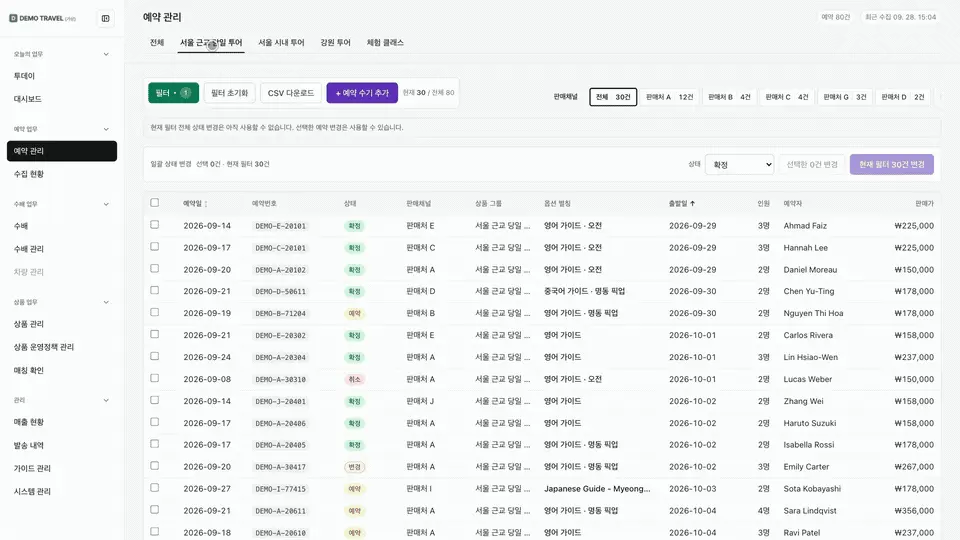
Organize bookings from each channel into common fields, ordered by departure date. Changed reservations are marked so staff can review the ones that need attention.
Show whether collection from each channel is successful or needs attention. Identify follow-up issues such as sign-in problems or missing customer information.
Group changes, missing information, matching and service arrangements by task type. Manage several actions for the same booking, including imminent departures and changes to review.
Show the previous and new passenger counts or amounts, with detection time and source. Staff compare the change with the original record before marking it as reviewed.
View bookings with pending or completed arrangements by date and product. Select the booking, enter the arrangement and prepare confirmation for guide and vehicle assignments.
Overview
Keep the way your team works
for the next task
Using personal memory and saved working methods, the agent prepares tasks in the background. Staff review the trip briefing and next actions when they need them
The inbound division of a leading Korean travel group
- Staff review results
- Save preferences and methods
- Reuse on the next task
01Knowledge held by individuals
Explaining the same working method again
Staff knew their reporting preferences and task sequence, but had to explain them in each new conversation. They also had to revisit the context of ongoing trips.
02Reusable working knowledge
Preferences and methods saved for reuse
Personal memory stores the staff member's preferences, while skills retain recurring working methods. Briefings refer to trip records to collect progress and next actions.
03Practical value
Start with what is already prepared
The agent uses saved methods to prepare work in the background. Staff review the briefing and next actions, then focus on decisions and follow-up.
Demo
Function details
See how personal memory, saved skills and briefings work together
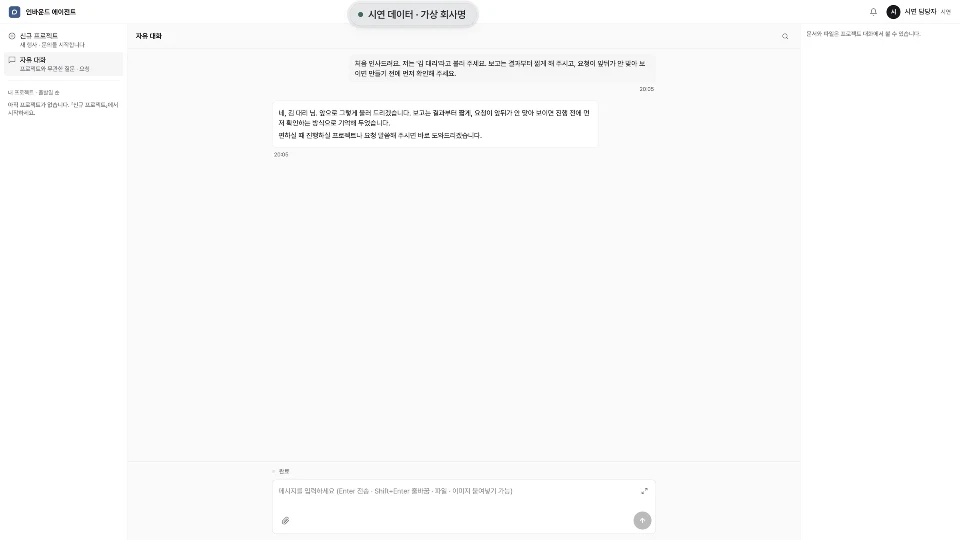
Save preferences such as forms of address, reporting style and review needs in personal memory. The agent refers to these preferences in later conversations.
Request and save a working method that is used repeatedly. Review saved skills in settings and reuse them when the next task calls for the same method.
Review ongoing trips, days until departure and the next actions together. The briefing brings information from several trip workspaces into one view.
Overview
From reservations to lessons,
one connected operation
We built and sold reservation, kiosk, membership and ERP systems for unmanned golf practice facilities in Japan. The facilities also provide AI swing analysis and lesson feedback
01Customer journey
From reservation to arrival
Checking the reservation, room and arrival details is the start of a facility visit. We implemented this through a self-service kiosk and operational screens.
02Facility management
Use records support membership and sales
Bookings, lessons, memberships and payments are grouped by member. Monthly summaries and daily activity support management through a shared operational view.
03Service development
Extend self-service with practice feedback
The facilities also offer AI swing analysis and lesson notes, extending the service from access to the facility to feedback on the customer's practice.
Demo
Customer and management functions
Explore the customer journey and the facility manager's screens
Review the date, start and end times, party size and assigned room in the reservation details. Booking conditions and space allocation are managed in the same view.
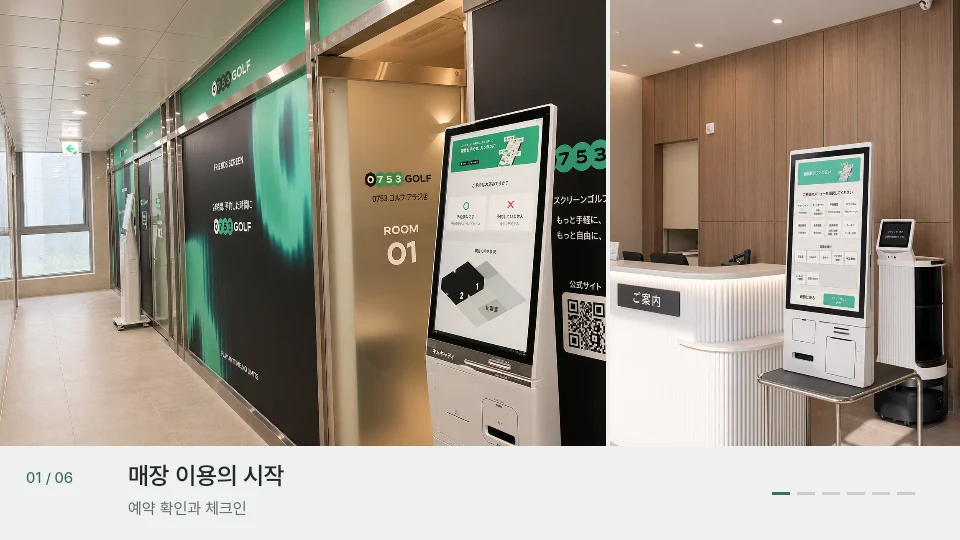
Customers check reservations and available rooms at the entrance kiosk. The terminal brings together check-in, check-out, reservation lookup and booking changes, memberships and coupons.
Customers use screen golf and practice equipment in their reserved private space. The actual entrance, reception terminal and practice areas in Japan were set up alongside the operational system.
Find a member's bookings, lessons, memberships and payments in one place. Completed, failed and cancelled status and room history support customer inquiries and follow-up.
Summarize sales by payment method, cancelled payments and membership usage. Monthly summaries and daily calendars show how products and spaces are being used.
The AI lesson service operating in the facilities combines swing video, posture analysis and corrective feedback. Customers discuss what to practise and use lesson notes and distance trends to guide the next session.
Contact us
Tell us about your team's work
We start by listening to the people who do the work